Voice Characters and Voice Banks
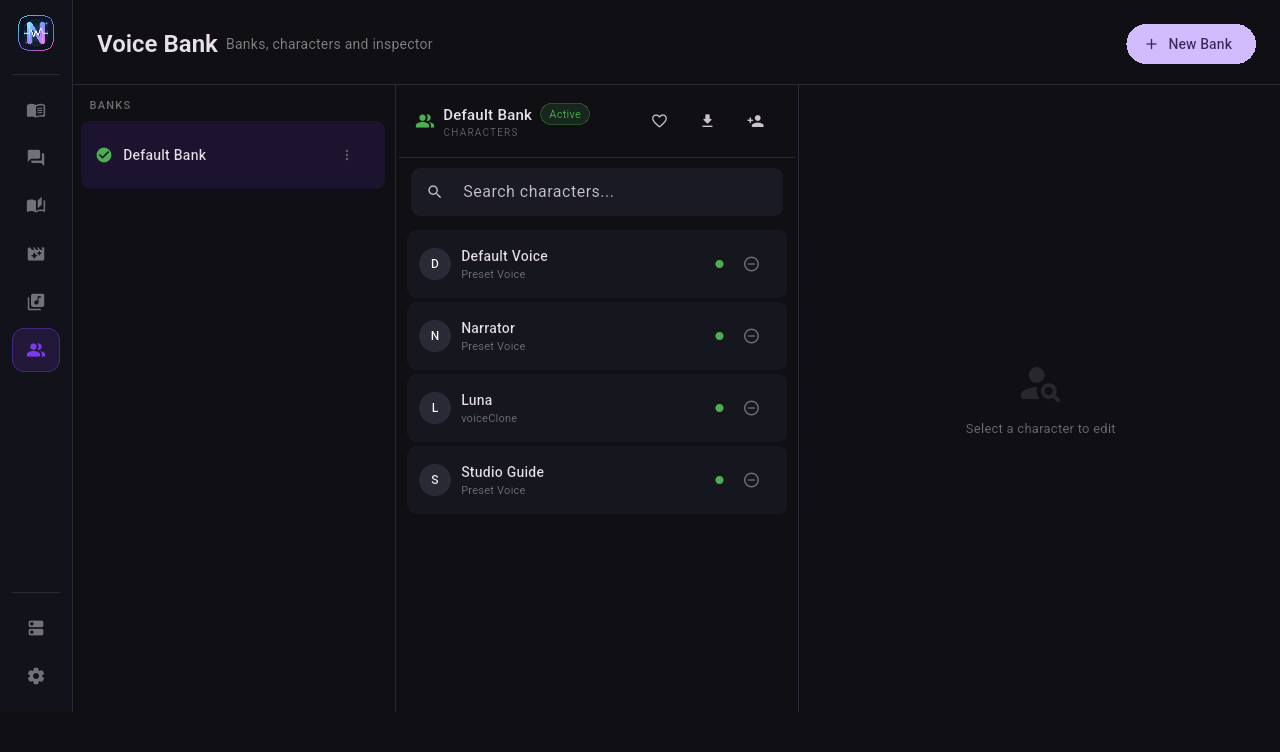
Voice characters are Neiroha's main project-level voice abstraction. A provider only describes how to reach a service. A voice character describes the speaker, model, voice, speed, cloning reference, and style used by workflows.
First Setup
- Finish provider setup and enable at least one provider.
- Open Voice Bank.
- Select Default Bank, or click + to create a new bank.
- Click New Character inside the selected bank.
- Select the provider, model, voice, or clone mode.
- Save the character.
- Type a short sentence in Quick Test on the right and generate audio.
What a Voice Bank Does
A voice bank is a set of voice characters. Projects bind to one voice bank, and every character selector in that project is populated from that bank.
| Use Case | Recommended Layout |
|---|---|
| Single narrator | Put one narrator character in one bank. |
| Audio drama or game dialogue | Put the full cast in one bank. |
| Multilingual testing | Split by language, such as Chinese Narration and English Cast. |
| API server | Put common characters in the active bank so /v1/audio/voices returns them. |
Create a Voice Bank
- Click + New Bank in the Voice Bank page.
- Enter a bank name.
- If this bank should be the default API bank, mark it as active.
- Select this bank when creating Dialogue TTS, Phase TTS, Novel Reader, or Video Dubbing projects.
The active voice bank affects the local API server:
/v1/modelsreturns active voice banks./v1/audio/voicesreturns characters in the active voice bank.POST /v1/audio/speechcan usemodelto scope voice lookup to one bank.
Create a Voice Character
Open Voice Bank, select a bank, then click New Character. Common fields:
| Field | Description |
|---|---|
| Name | Display and matching name used by the UI, projects, and API requests. |
| Provider | An enabled provider. |
| Task mode | Controls whether the character editor shows preset voices, reference audio, or voice instruction fields. |
| Speed | Synthesis speed multiplier, usually between 0.5 and 2.0. |
| Avatar | Optional image displayed in dialogue bubbles. |
Choose Task Mode by Backend
| Mode | Typical Backends | Main Fields |
|---|---|---|
| Preset voice | OpenAI-compatible services, Azure, Windows SAPI, Gemini | Select a voice from the provider voice list. |
| Voice clone with prompt | GPT-SoVITS, CosyVoice, VoxCPM2 | Provide reference audio and matching transcript when required. |
| Voice design | Models that accept voice_instruction or Chat Completions audio output | Describe the desired voice in natural language. |
Provider-Specific Character Fields
| Provider | Most Important Fields |
|---|---|
| OpenAI-compatible | Model and preset voice. |
| MiMo | Model, preset voice, voice instruction, or clone reference depending on mode. |
| Gemini | Model, Gemini preset voice, optional voice instruction. |
| Azure | Azure voice short name, such as zh-CN-XiaoxiaoNeural. |
| GPT-SoVITS | Registered voice, or reference audio plus prompt text. |
| CosyVoice | Profile, prompt audio, prompt text, or instruction text depending on mode. |
| VoxCPM2 | Registered voice, design instruction, clone audio, or prompt audio. |
| Windows SAPI | Installed Windows SAPI voice. |
If model or voice dropdowns are empty, return to the provider page and click Fetch All. If the backend does not expose list APIs, enter the model or voice name manually.
Test Immediately After Creation
Do not start a long batch right after creating a character. Test one sentence first:
- Select the new character.
- Enter one short sentence in Quick Test.
- Click generate.
- If audio plays, the provider, character, and queue are usable.
- Then move to Dialogue TTS, Phase TTS, or Novel Reader.
Troubleshooting
| Symptom | Action |
|---|---|
| Character cannot be saved | Check required fields, especially provider, task mode, voice, and reference audio. |
| Provider dropdown is empty | The provider is disabled or unsupported on the current platform. |
| Voice dropdown is empty | Click Fetch All on the provider page, or fill the voice manually. |
| Quick Test returns 401 / 403 | Check API key, Azure region, or cloud account permissions. |
| Quick Test returns 429 | Lower provider concurrency and RPM / RPD limits. |
| Local clone cannot find reference audio | Make sure the file is reachable from the current device. Android cannot read a Windows local path. |