A provider is Neiroha's connection entry for an external TTS backend. It stores how to access the service. The actual voices used by projects are bound later in Voice Characters and Voice Banks.
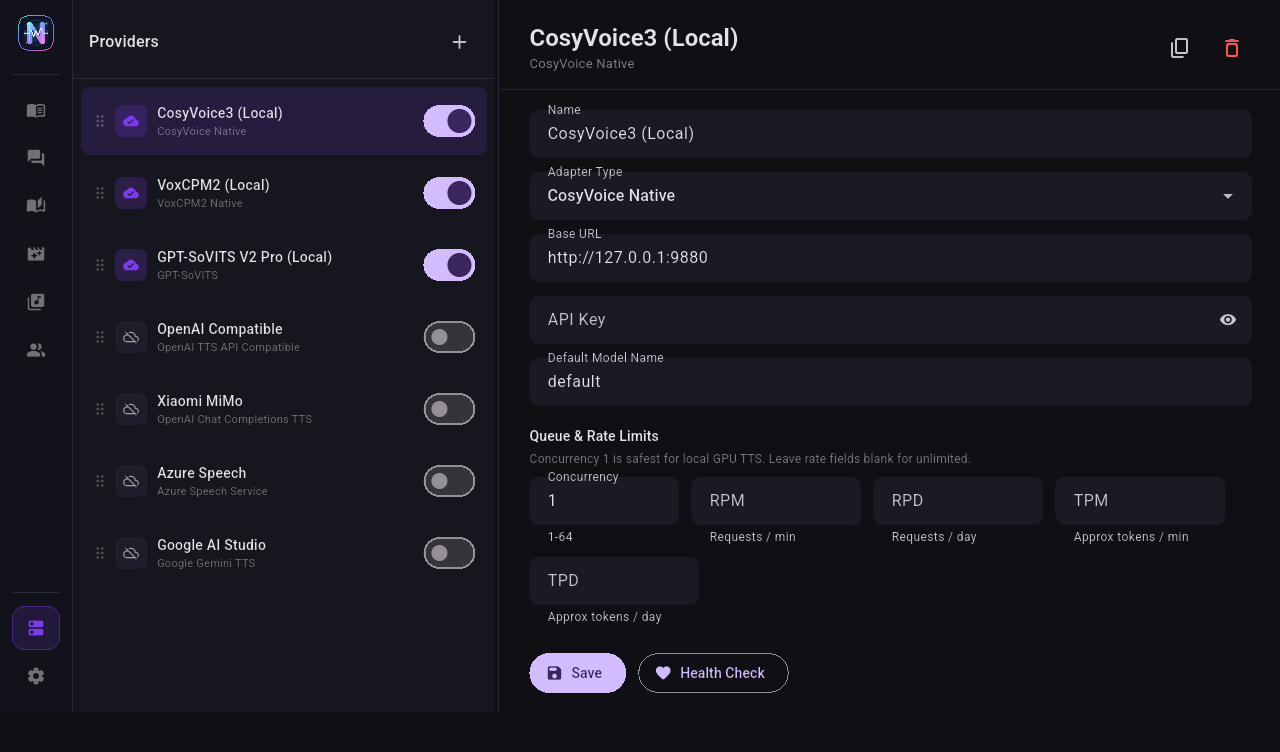
Core Relationship
| Layer | Location in Neiroha | Purpose |
|---|
| Provider | Providers | Stores Base URL, API key, adapter type, concurrency, and rate limits. |
| Model / Voice Cache | Provider detail panel | Caches models and voices fetched from the backend. |
| Voice Character | Voice Bank | Binds one provider, model, voice, speed, reference audio, or voice description into a character. |
| Voice Bank | Voice Bank | Groups characters for Dialogue, Phase, Novel, Video, and API workflows. |
Adapter Types
| Adapter | Use Case |
|---|
| OpenAI TTS API Compatible | OpenAI-compatible /v1/audio/speech services such as Kokoro, XTTS, Orpheus, KoboldCpp, or custom wrappers. |
| Azure Speech Service | Microsoft Azure Speech TTS. |
| GPT-SoVITS | Neiroha GPT-SoVITS local backend. |
| CosyVoice Native | Neiroha CosyVoice local backend. |
| VoxCPM2 Native | Neiroha VoxCPM2 local backend. |
| OpenAI Chat Completions TTS | Audio returned through Chat Completions, such as MiMo v2 TTS. |
| Google Gemini TTS | Google AI Studio Gemini TTS models. |
| Windows System TTS | Windows SAPI voices without an external server. |
Create a Provider
- Open Providers from the left navigation.
- Click + at the top of the provider list.
- Select an adapter type. Local model setup is covered in Connect Local Inference Backends; cloud or free quota setup is covered in Connect Cloud Inference Backends.
- Set a name, such as
MiMo Free Trial, CosyVoice Local 9880, or Azure East US.
- Fill
Base URL and API Key.
- Save, return to the provider detail panel, click Fetch All, then enable the provider.
- Click Health Check. After it passes, create voice characters.
Base URL Rules
| Scenario | Example | Notes |
|---|
| Desktop app to local service | http://127.0.0.1:8880/v1 | OpenAI-compatible services usually include /v1. |
| Desktop app to LAN service | http://192.168.1.20:9880 | Allow the port through the firewall. |
| Android emulator to host machine | http://10.0.2.2:9880 | 127.0.0.1 inside the emulator means the emulator itself. |
| Android phone to computer | http://LAN-IP:9880 | Phone and computer must be on the same network, or reachable through tunneling. |
| Azure | eastus or https://eastus.tts.speech.microsoft.com | Neiroha normalizes region names to TTS endpoints. |
| Gemini | https://generativelanguage.googleapis.com | Uses Google AI Studio API key. |
| MiMo | https://api.xiaomimimo.com/v1 | Uses the api-key header, not a Bearer header. |
API Key and Authentication
| Adapter | Key Required | Authentication Used by Neiroha |
|---|
| OpenAI TTS API Compatible | Depends on server | Authorization: Bearer <key> |
| OpenAI Chat Completions TTS | Usually required for cloud | api-key: <key> by default for MiMo-style APIs |
| Google Gemini TTS | Required | x-goog-api-key: <key> |
| Azure Speech Service | Required | Ocp-Apim-Subscription-Key: <key> |
| GPT-SoVITS / CosyVoice / VoxCPM2 local | Usually empty | Fill only if the local server enables authentication. |
| Windows System TTS | Not required | Local SAPI |
After Fetch All
Click Fetch All to cache backend models and voices. This determines what appears in character creation dropdowns.
| Result | Meaning | Action |
|---|
| Models and voices both appear | Full listing works | Enable the provider and go to Voice Bank. |
| Models appear, voices are empty | Backend lacks a voice-list API, or model uses voice design | Fill voice or instruction manually. |
| Voices appear, models are empty | Common for Azure or system TTS | Select a voice in the character. |
| Empty list but Health Check passes | Service is reachable, but list APIs are incompatible | Fill default model and voice manually, then run Quick Test. |
| Health Check fails | URL, key, port, network, or region is wrong | Verify the backend with browser or curl, then update the provider. |
Separate Concurrency from Quota
Provider concurrency, RPM, TPM, and RPD limits apply to all workflows: Quick TTS, Dialogue TTS, Phase TTS, Novel Reader, Video Dubbing, and the local API Server share the same TtsQueueService.
Recommended starting points:
| Backend | Recommended Setting |
|---|
| Local GPU service | Start max concurrency at 1, then increase after VRAM is stable. |
| Gemini free tier | Follow official RPM / TPM / RPD rate limits to avoid 429 errors. |
| Azure F0 | Mainly control character quota and batch size; test long text in small Phase TTS batches. |
| MiMo / other token plans | Use console balance and model consumption rules; set conservative RPD / TPM. |
Next Steps